portierX can read a master key plan straight out of the file your locksmith or system manufacturer already produces. You upload the file once, check what is in it, and confirm. Nothing gets typed in twice.
The portier XML file describes exactly one locking system. Its own code and description, its buildings, its cylinders, its single keys and group keys, and the functions that set out which key turns in which cylinder. Locksmiths and manufacturers produce the file from their own planning software. The field names inside it are German, so the file looks the same wherever you are.
Two things matter before you upload. The file names the manufacturer it came from, and portierX checks that against the tile you picked. And every building, cylinder and key needs the manufacturer's own stable identifier. If one is missing, portierX rejects the file and names the item at fault. A second attempt will not help, only a fresh export from your locksmith.
Eight manufacturers are connected through a file: ABUS, CES, DOM, dormakaba, EVVA, KESO ASSA ABLOY, WILKA, WINKHAUS. You will find their tiles under Integrations, in the master key systems category.
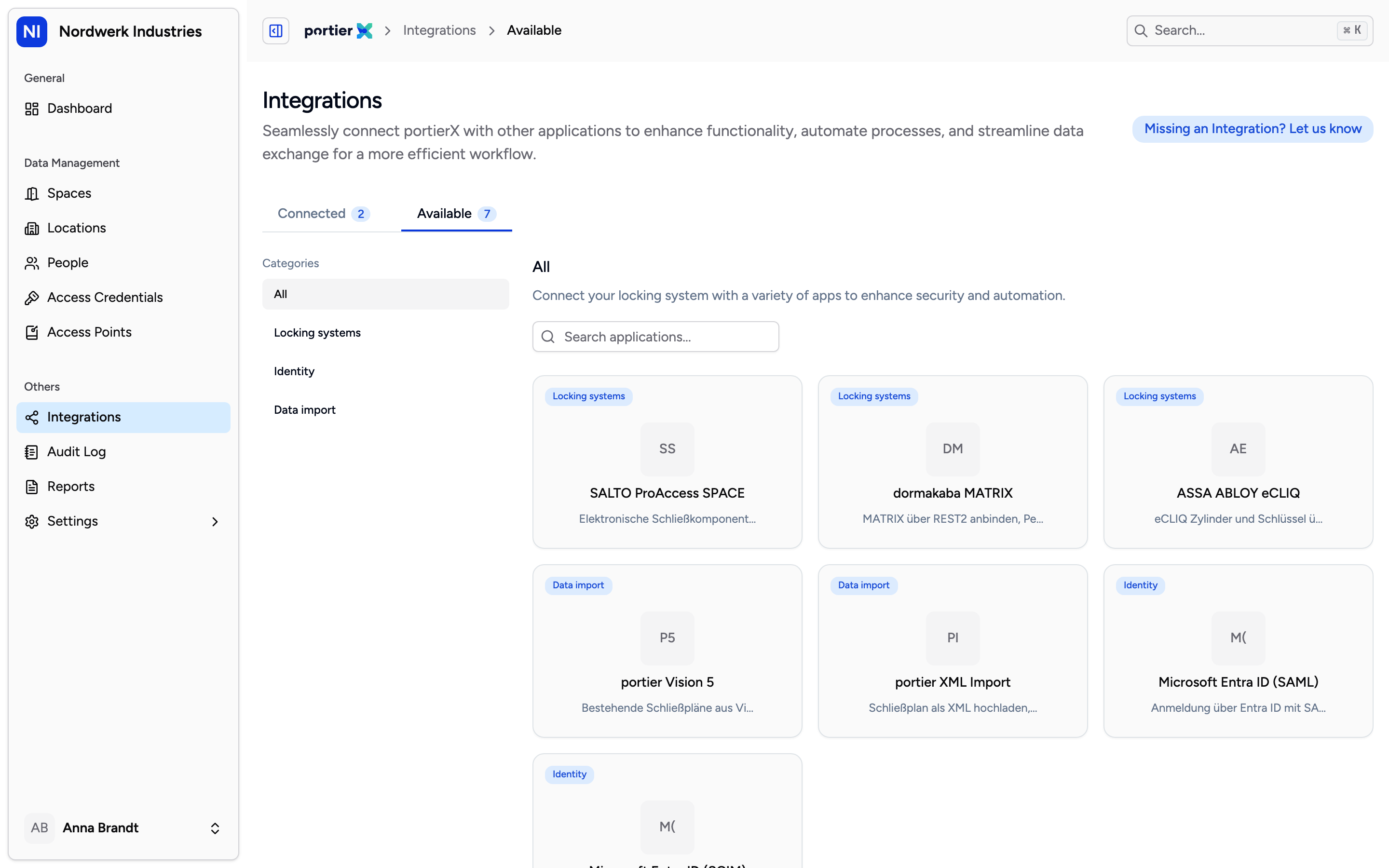
The catalogue shows every connection side by side. Only the master key system tiles lead to a file upload, the rest are connected another way.
Two more connections in the same catalogue work without a file. portier Vision 5 and dormakaba MATRIX are connected with credentials you enter, not with an upload, which is a different job from the one in this article. Some tiles are placeholders too, visible but not connectable yet.
Open Integrations and pick your manufacturer's tile.
Drag the file onto the drop area or use Choose Files. XML only, 100 MB at most. Anything else is refused before it leaves your browser.
Add a short description if you want to tell one upload from another later. The field is optional.
Switch Automate Migration Review off.
Step 4 is the one that goes wrong. Left on, portierX applies the file immediately and puts you on Import Log with the work already done. Switched off, you land in the review first, and nothing reaches your data until you agree to it. On a first import that is the difference between correcting a plan and cleaning one up.
The review has five tabs.
Overview: the File Information from the file's header, and the figures under Summary, which are Access Credentials, Access Points, Building Managed and Space Managed (Room).
Location: the buildings and spaces the file describes. A locking plan often names buildings and little else. This is where you fill the gaps, using Create New Location and the building and space forms.
Access Credential: every key, single and group.
Access Points: every cylinder.
Locking Plan: the matrix itself, cylinders down the side, keys across the top, with a legend for Same-key Locking, Shared-key Locking, Group Key, Central Cylinder and Locks Into.
Confirmation sits at the bottom. Tick I Acknowledge & Agree to Data Integration, then Finish & Confirm, then confirm once more in the dialog that follows. Only then does anything land in your live data. Until that point the import is staged, and you can walk away from it without consequence.
Your locksmith extends the system, you get a new file, you upload it against the same connection. portierX compares it with what you already hold and shows you the differences before anything is applied. Changed values come up one by one for review, each row set to either Use New or Keep Current. New and deleted items sit separately and are accepted or ignored row by row. Whatever stayed the same is listed on its own.
The comparison covers what the file describes: the locking system, buildings, cylinders, single keys, group keys and functions.
Spaces you created yourself, people you added, and the keys you handed out sit outside the comparison. A new file does not touch them and will not reconcile them for you. Plan the first import carefully rather than counting on the second one.
The road runs one way. What you change inside portierX does not travel back into your locksmith's file.
One import runs per connection. A second upload while one is still running is refused, not queued.
A locking system belongs to exactly one connection. If the file names a system another connection already owns, portierX points you there instead.
Not every failure is worth a second attempt. A download that broke off is. A file with missing identifiers or damaged XML is not, and that one needs a new export. A file whose manufacturer does not match the tile you picked is different again. The file itself is fine, and portierX offers to set up the integration for the manufacturer the file actually names.
