Your locking system has grown and you have a new XML file. The question before uploading is always the same: what will the file do to what is already there?
portierX can show you first. Whether it does depends on a setting, and that setting is by default set so that it does not.
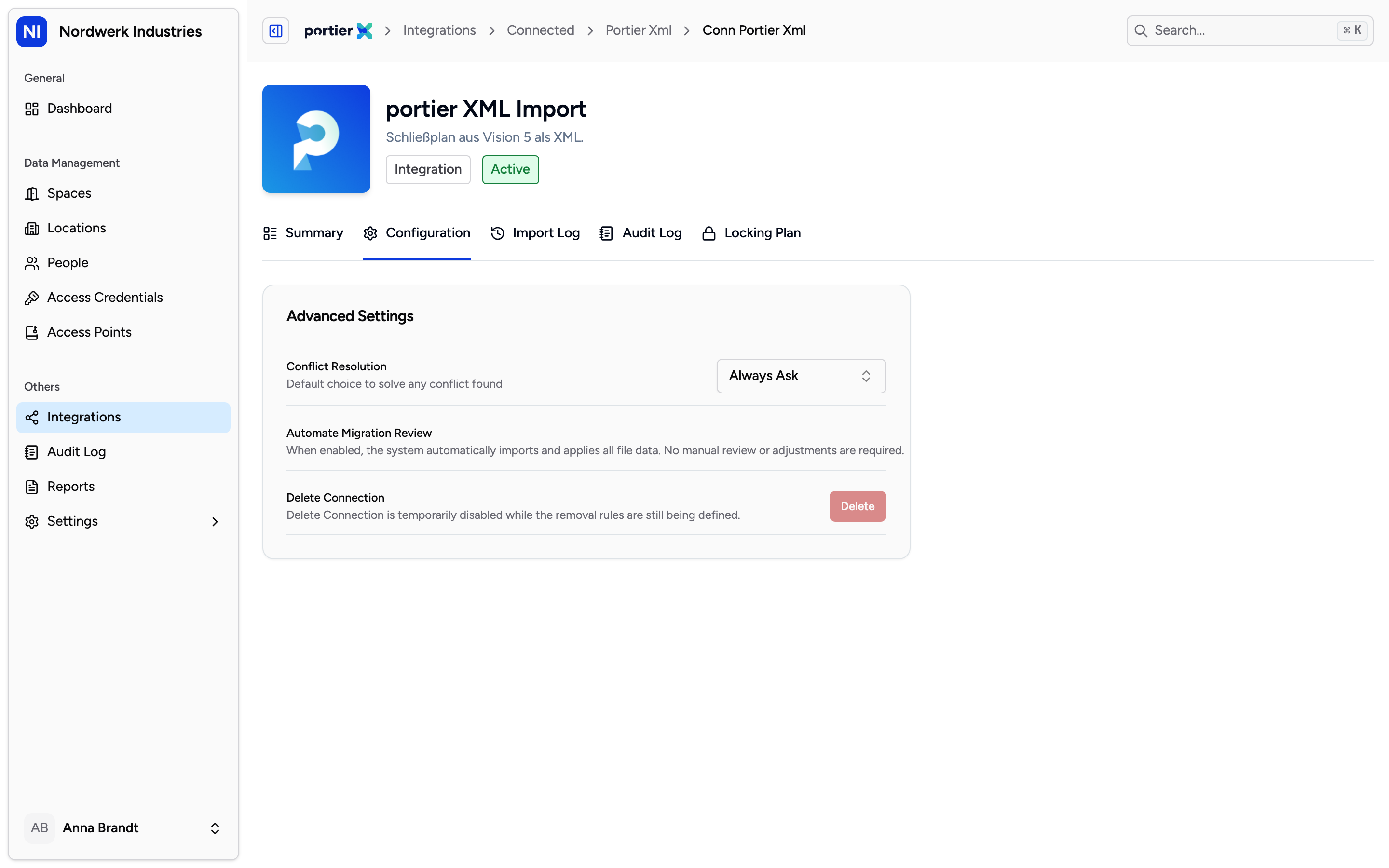
Conflict Resolution and the switch below it. The switch is the coarse version of the same setting.
On the connection, under the Configuration tab, Advanced Settings holds Conflict Resolution. It has three values, and only one of them asks you anything.
Always Ask stops the import and puts it in front of you. It is the only value that gives you a decision.
Keep Current applies the file unattended, keeping your existing value at every conflict.
Use New applies the file unattended, taking the file's value at every conflict.
Beside it sits the Automate Migration Review switch. It is the two-value version of the same thing: on whenever the setting is not Always Ask. Switch it off and the setting moves to Always Ask. Switch it on and the setting moves to Use New.
Two things worth knowing about it.
When you create a connection through the file upload, the switch is on. A first import is applied without review.
The switch cannot get you back to Keep Current. If your setting is Keep Current, the switch reads on. Turn it off and on again and you are on Use New, not back on Keep Current. If that is the value you want, use the dropdown, not the switch.
With the setting on Always Ask, an uploaded file does not land in your data. It lands on Review Changes, headed by the note "Changes will not be applied until they are reviewed and confirmed."
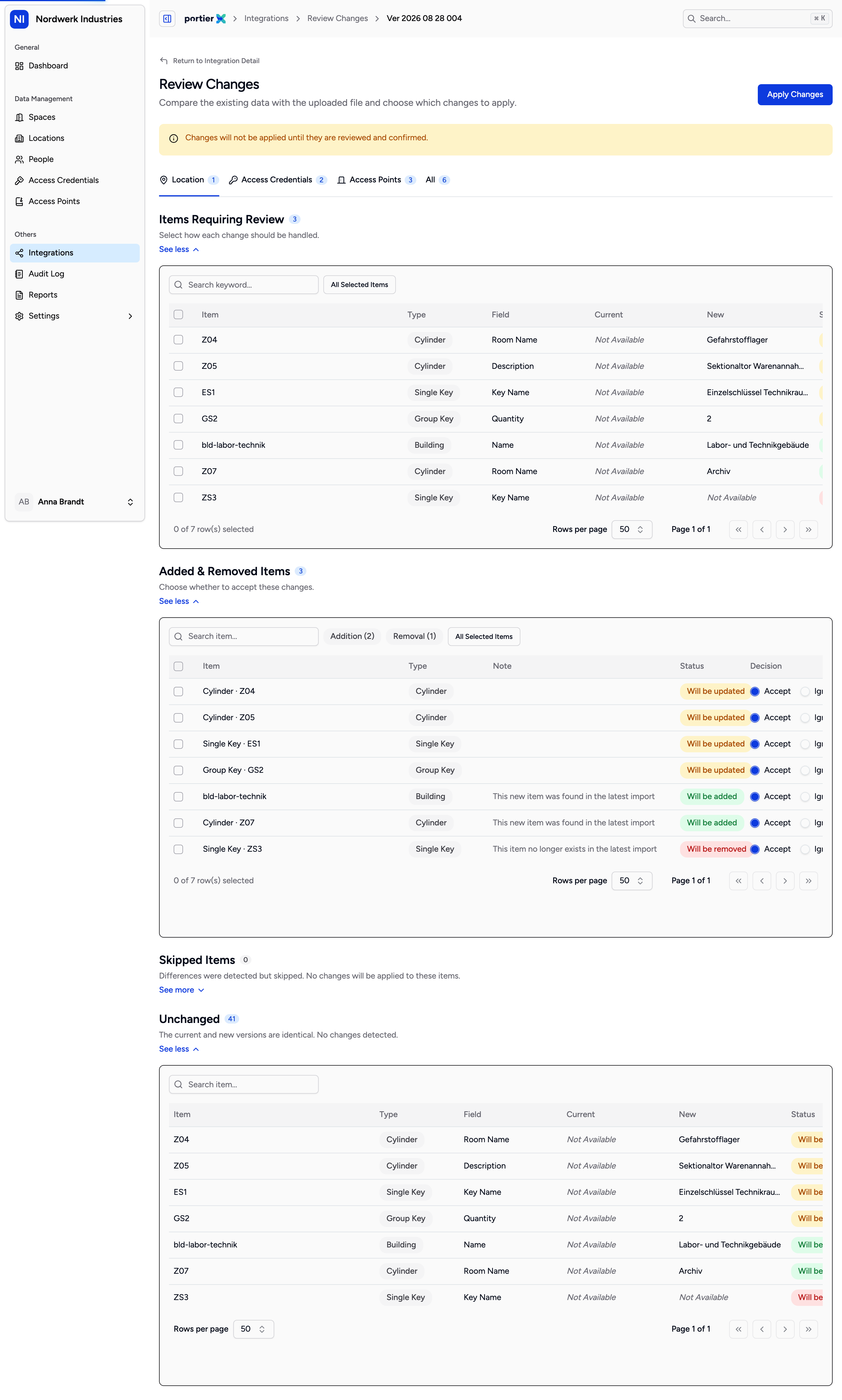
Four sections. You decide something in the first two only; the other two are there to read.
The screen has four sections.
Items Requiring Review are the changed values. Each row shows the existing and the new value side by side, and you choose Use New or Keep Current.
Added & Removed Items are the new and the vanished entries. Here the choices are Accept and Ignore. Each heading carries its count.
Skipped Items are differences that were detected and will not be applied. The subtitle says it: nothing changes on those.
Unchanged is the rest, where the current and new versions match.
With many rows, Set Selected To helps: tick several rows and set them all to the same answer at once.
This is the most important part of this article.
You cannot review the keying itself. Which key turns in which cylinder follows the file automatically. The screen tells you so, with a line naming how many key-to-door permissions changed in this import and stating that they follow the file automatically and cannot be reviewed individually.
So you decide about the objects, not about the matrix. Anyone who needs to know what is changing in the keying compares the plans at the locksmith, not here.
Confirm to Apply Changes sums up what you decided, in the form of how many updated, kept, added and removed. Below it sits the warning that your records will be updated immediately and that the action cannot be undone once confirmed, and a box to acknowledge it.
Until then nothing has happened. You can leave the screen and come back.
A second upload discards the first. If an unreviewed import is still waiting and you upload again, portierX asks, and tells you the earlier import and all its unreviewed changes will be permanently discarded. Finish reviewing before you upload again.
An import can lapse. When a version is no longer reviewable it reads Review not available, with the reason. A review screen is not an in-tray.
What you created yourself is not up for discussion. Spaces you made in portierX, people, and keys you issued are not part of the comparison. The file does not touch them and will not reconcile them either.
The road runs one way. What you decide in portierX does not travel back into your locksmith's file.
Without Always Ask there is no review screen. Not later, not retrospectively. The decision is made before the upload, in the setting.
