An auditor asks four questions. Who had access. Who decided that. When was it taken back. What is your evidence.
This article says what portierX gives you for each of them, and where you need another source. That belongs before the audit, not in the middle of one.
The Audit Log records what was done in portierX. Every entry names who acted, on what, the action and the time. Issuing and returning a credential are in there, records created and changed, role changes, sign in and sign out, imports and every sync.
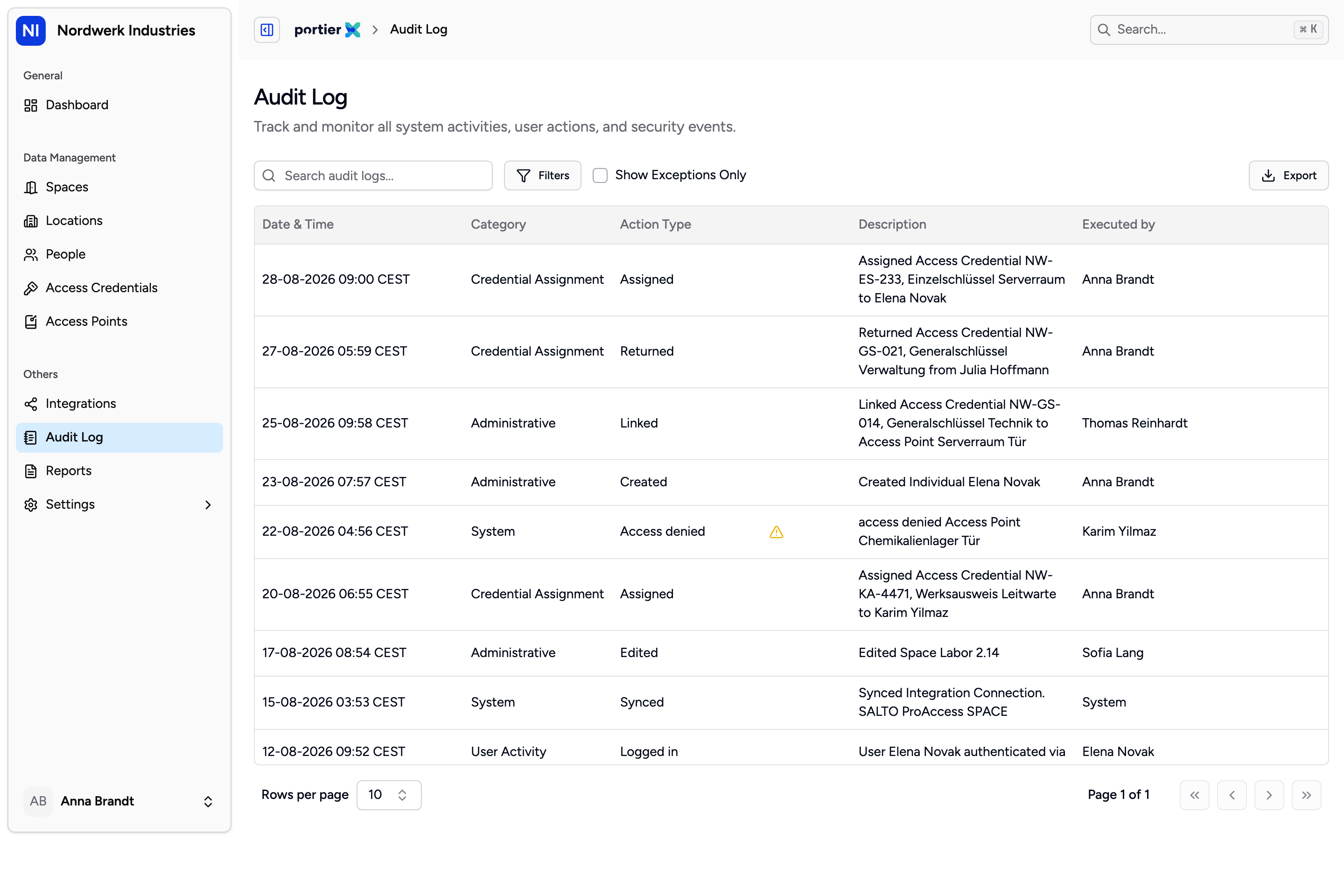
The description column is already a finished sentence. For handing to an auditor, the export is the artefact, not the screen.
For an auditor, though, the file is what counts, not the view.
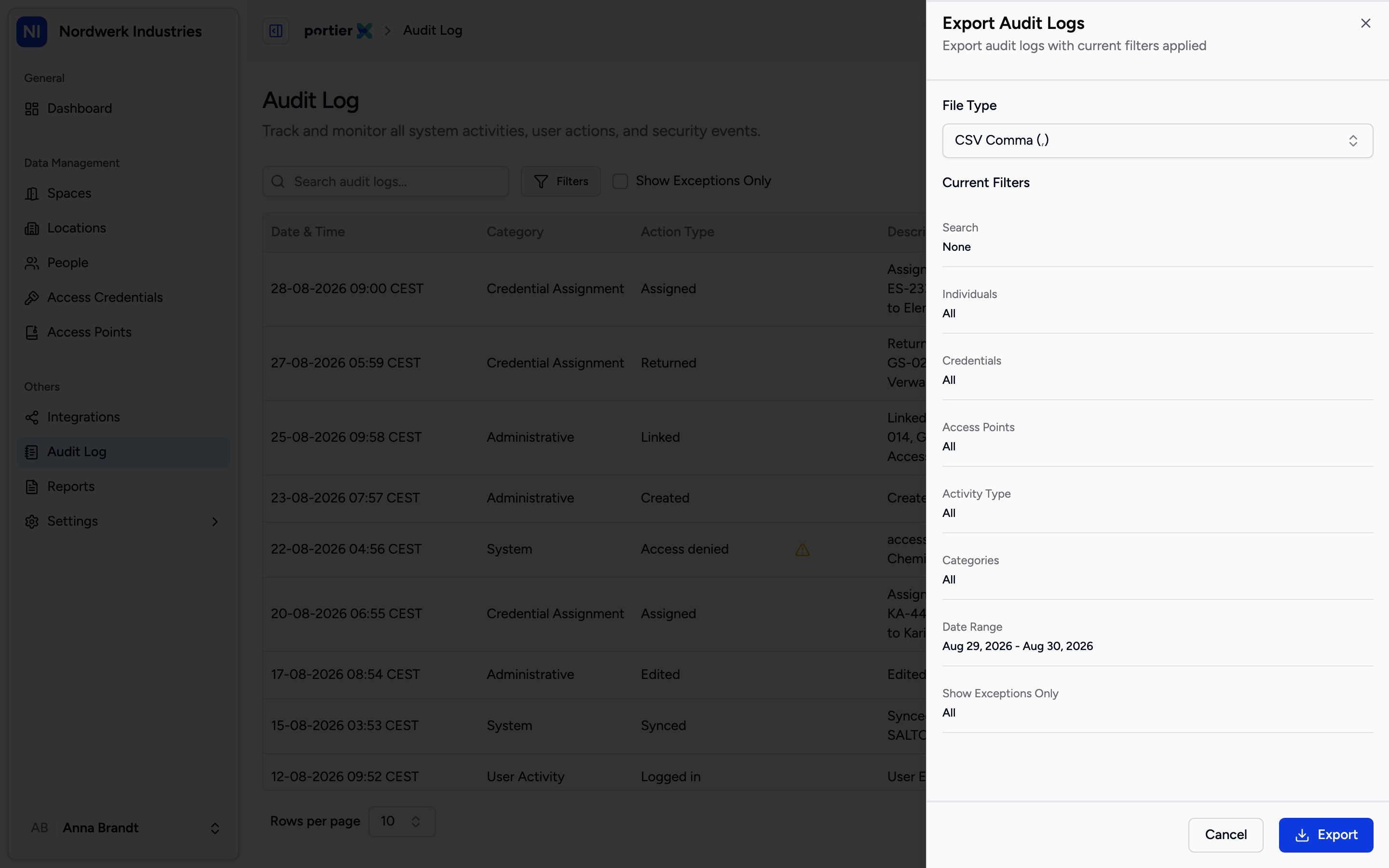
File Type sets the format, and below it the panel states which filters are going into the file.
Export opens Export Audit Logs. File Type offers CSV Comma, CSV Semicolon and Excel (.xlsx).
The file carries eighteen columns, considerably more than the screen shows. Five of them are the ones evidence rests on.
Event ID is the unique handle for a single event. It lets a row be found and cited later.
Occurred At is when the thing happened, Created At when it was written down. Cite Occurred At.
Actor Name and Actor Type say who acted and in what capacity.
Target Name and Target Type say on what.
Is Exception marks what failed. An auditor asking about refused or failed operations gets their answer from it, and on screen from Show Exceptions Only.
The export inherits whatever filters are set and returns every matching row across every page. The export is itself logged, which answers a question that does occasionally get asked.
Every issue of a credential produces its own record, the Handover Proof Details. It carries a Document ID, the Assignment Date, the Confirmation Date, the people involved and the credentials handed over.
The field that matters is Method. It separates a handover the recipient confirmed with a PIN from one a member of staff declared offline against a paper form. Both are legitimate, but they prove different things, and an auditor reading closely will see the difference.
Roles Overview under Settings shows the five roles and their rights, line by line. That answers what anyone was permitted to do in portierX, separately from what they actually did.
Access is bound to the organisation. A login belongs to one organisation, and a request for another organisation's data is refused. For an auditor looking at several tenants in one system, that is the relevant statement.
Four limits, and you want all four before somebody asks.
Door openings are not in it. The log holds what people did in portierX. Who actually walked through a door and when is not there, and on a mechanical locking system that record does not exist anywhere.
You cannot set the retention period. Roles Overview does list a right called Set Retention Policy, but that is a row in a permissions matrix, not a button. No such setting exists in portierX. What does run is a cleanup that removes log entries belonging to deleted people after a period set on the deployment. How long your data is held overall is agreed with portier, and you want that answer in writing before you give it to an auditor.
The Audit Log tab inside a space is not scoped to that space. It shows the whole organisation's record. Reading it as evidence for one area produces the wrong document. Use the tab on the access point, which is scoped correctly, or the filter on the audit log page.
An incident proves a report, not a lock-out. Report a key lost and portierX blocks the credential inside portierX. Whether the key still turns in your door is a question for your locking system.
