You report an incident when a key or card is gone, stolen or damaged. It needs the Organisation Admin, Access Manager or Credential Manager role. The report starts with Report Incident in the copy's menu, on the key's Copies tab or in the Access Credentials list.
Also called: lost key, lost card, damage report. portierX calls each of these reports an incident; the key or card is a credential.
Know which copy it is. The report applies to one copy, not to the whole key.
Have the number of the police report or work order to hand, if there is one.
Open the copy's menu and choose Report Incident. The menu sits on the key's Copies tab, in the Access Credentials list, in the credential's details panel, on the person's row under Assigned Access Credentials and on the access point's row of credentials that turn in it. Every way opens the same Report incident dialog.
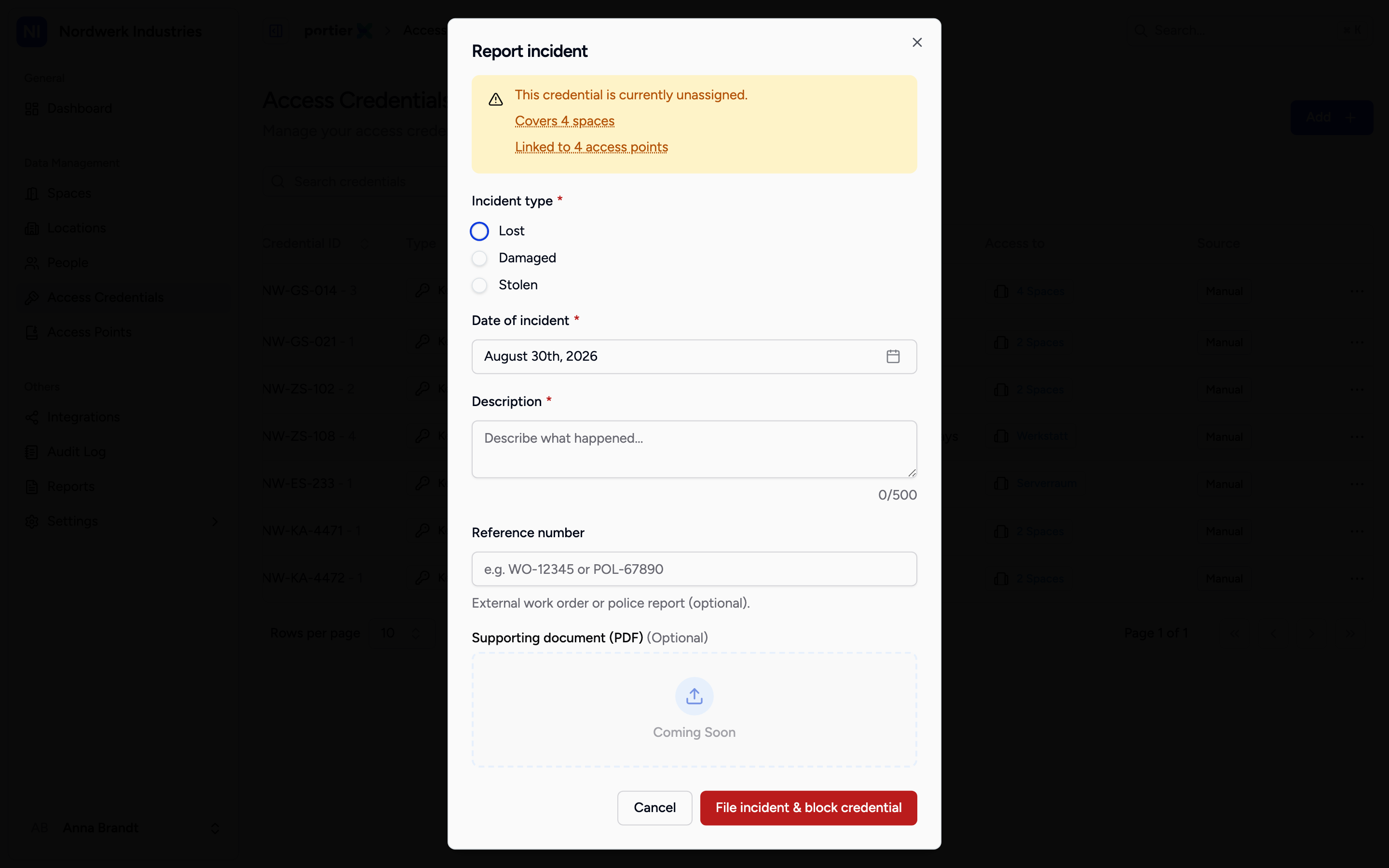
The top of the dialog says whose access the report blocks and how many spaces and access points are affected. Read that line before you submit.
Read the note above the form. It names the person whose access is about to be blocked, or says that the credential is unassigned, and counts how many spaces the credential covers and how many access points it is linked to; the names appear when you hold the pointer on the line. A group key covers many doors, and the block reaches all of them.
Under Incident type, choose one of Lost, Damaged and Stolen. Required.
Under Date of incident, set the day it happened, not the day you report it. It defaults to today, and a day in the future is refused.
Under Description, say what happened. Required, 500 characters at most.
Under Reference number, enter your own case number, such as the work order or the police report. Optional, 100 characters at most. The report takes no file; the number is the pointer to the document.
Choose File incident & block credential. Cancel discards the report.
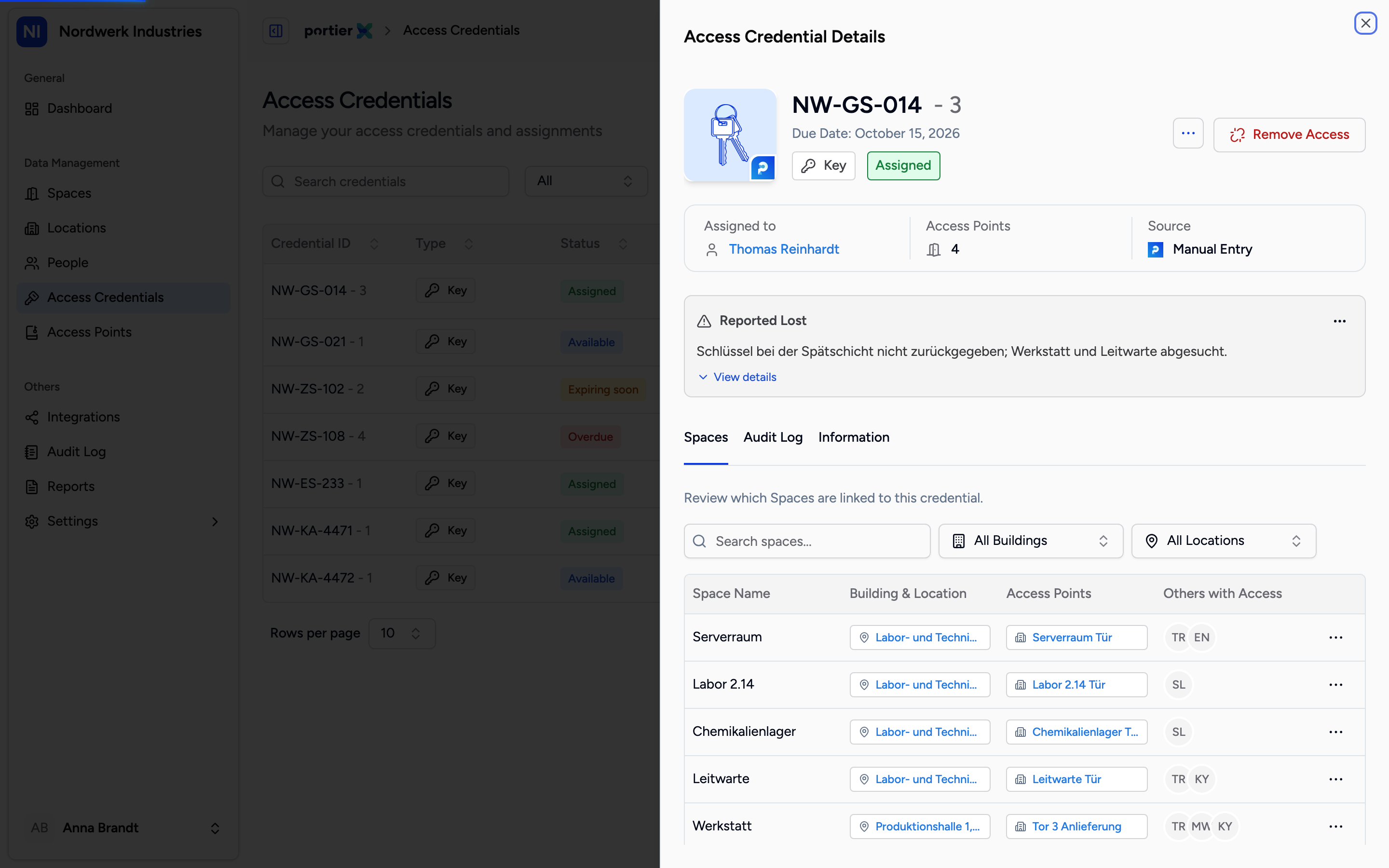
The open incident card sits in the credential's details panel and carries the type, the description and who filed it.
The copy reads Lost (lost or stolen) or Defect (damaged) on the Copies tab, and its button reads Resolve. The key's People tab lists the holder under Held before with the outcome Reported lost, Reported stolen or Returned, defect.
The credential's details panel carries the Open incident card, headed Reported Lost, Reported Damaged or Reported Stolen, with the description. View details opens Reference, Date of incident and Filed by. The card's menu offers Edit incident and Resolve incident.
The credential is blocked for any assignment until the incident is resolved. The Audit Log records the report with its type.
For Lost, a connected locking system is told at once: SALTO cancels the key, dormakaba MATRIX revokes the person's credential, ASSA ABLOY eCLIQ declares the key lost, Interflex blocks the badge.
For Lost, an email with the subject Key reported lost and the key's code also goes at once to every user with the Security Monitor role, in the organisation's language. It names the date and asks them to check what the key opens and decide whether locks need to change; Open the key leads to the key's Copies tab. Nobody can switch this email off. If the organisation has no Security Monitor, no email goes.
The report opens no door and closes none. On a mechanical locking system the lost key keeps turning; what you change at the door is your decision.
A credential reported stolen or damaged is blocked inside portierX. A connected locking system hears only of a loss. A credential reported stolen keeps opening doors there until it is blocked in the locking system.
One incident is open per credential. A copy with an open incident and an archived copy do not offer Report Incident.
The report takes no file. The number of the police report or work order goes into Reference number.
Edit incident on the card changes the Reference. Type, date and description stay as filed.
A Credential Manager can report but not resolve. Resolving needs the Organisation Admin or Access Manager role (see Close out an incident).
An incident stays open until somebody resolves it. Reporting alone closes nothing.
