
portierX manages who can go where. Across every site, mechanical and electronic access in one view. This article shows you how the application is laid out and where each job gets done.
The navigation
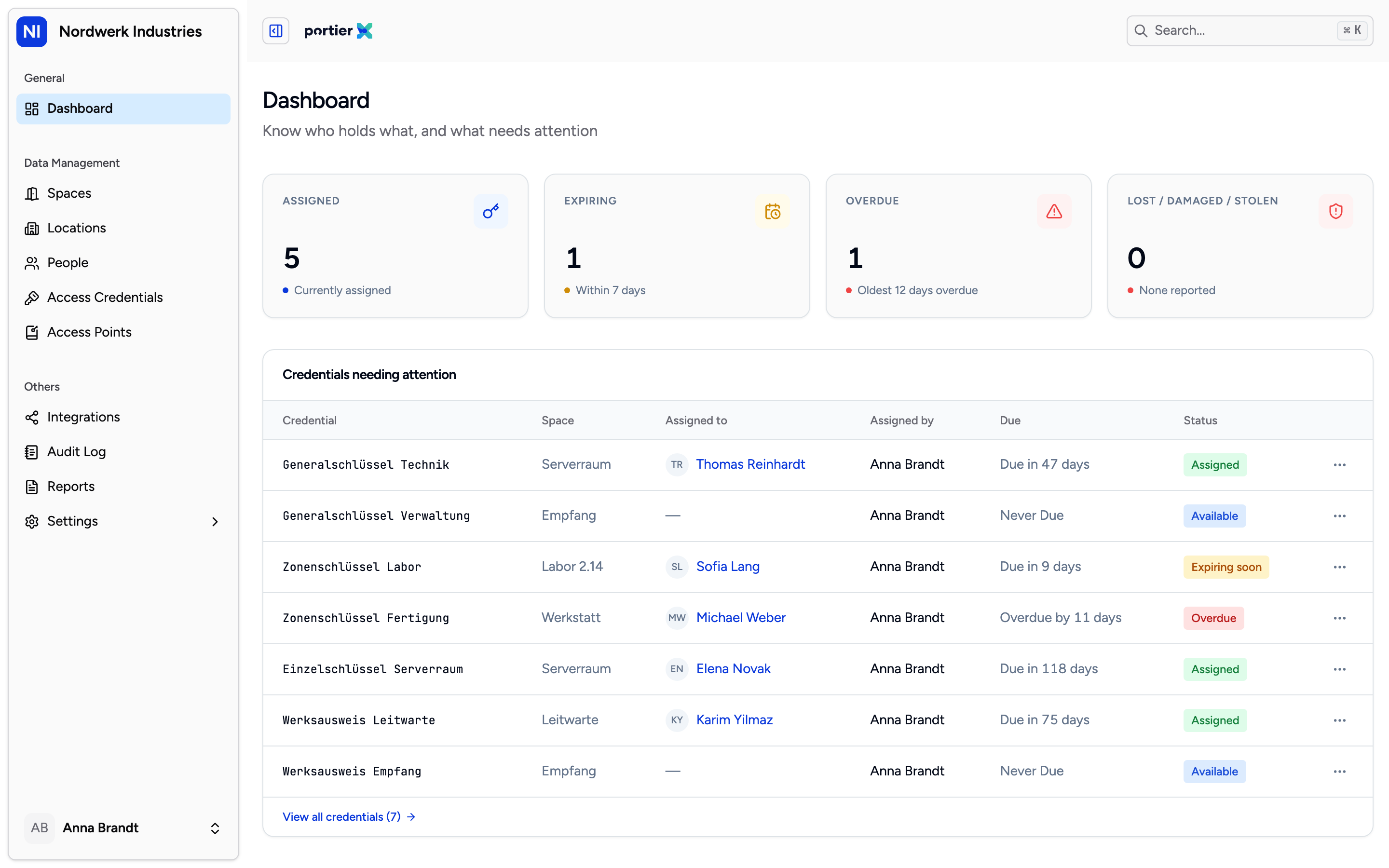
The sidebar is the whole application. Three groups, and you only see the entries your role allows.
The sidebar splits into three groups.
General holds the Dashboard, the page you land on after signing in. Four tiles count what is assigned, expiring, overdue and reported lost, damaged or stolen. Below them sits the list of credentials needing attention, with the holder, the due date and the status. At the bottom sits a Reports section with three reports. The downloads are not switched on yet.
Data Management is the daily work.
Spaces: the areas people need to reach. A room, a floor, a zone. Usually the starting point, because most questions begin with a place.
Locations: your sites and the buildings on them. Locations and buildings are the containers spaces sit inside.
People: everyone who needs access. Staff, contractors, anyone holding a credential.
Access Credentials: the thing a person holds. Mechanical keys, cards, PINs.
Access Points: doors, gates, barriers, cylinders. The place a credential gets used.
Others holds setup and the record.
Integrations: the connections to your locking systems and your identity provider. This is also where you import a master key plan.
Audit Log: every change, with who made it and when.
Reports: credential incidents, such as a key reported lost.
Settings: users, area managers, appearance.
How the pieces fit together
Five words, one chain. Think it through once and the rest of the application explains itself.
A location contains buildings. A building contains spaces. A space has access points attached, the doors you get in through. An access credential covers one or more access points. A person holds one or more access credentials.
Which gives you the sentence that explains the daily work. You do not give a person a door, you give them a credential, and the credential opens the doors.
Your first hour
Create your locations and buildings. Without them, spaces have nothing to sit in.
Create your spaces. Name them the way your colleagues name the rooms, not the way the floor plan does.
Add access points and link them to spaces. An access point with no space shows up in no report later.
Add people. One at a time, or as a CSV import.
Assign access. This is where a person and a door finally meet.
Step 3 is the one people skip and regret. The link between an access point and a space is what every credential recommendation is calculated from.
What you will not find yet
Better said plainly than found by a search that returns nothing.
The dashboard looks at credentials. There is no general activity feed on it, and you cannot choose what it shows.
Access cannot be limited to a fixed period. A due date is recorded but not enforced.
Groups collect people, but do not grant access to all their members at once.